Quick Answer: How Should You Plan a Business Website?
Planning a business website starts with defining your business goals, identifying your target audience, deciding which pages and features you need, preparing content, setting a budget, and establishing technical and SEO requirements. Before development begins, document the project scope, website structure, design expectations, functionality, timeline, and success metrics. This preparation helps reduce misunderstandings, avoid unnecessary expenses, and ensure that the finished website supports your business objectives.
Introduction
Building a business website development involves much more than selecting a design, writing content, and publishing pages. A successful website requires careful planning to ensure that its structure, functionality, messaging, and technical foundation meet the needs of both the business and its customers.
Without a clear plan, businesses may discover important problems after development has started. They might realise that essential service pages are missing, the enquiry process is inconvenient, the chosen technology cannot support a required feature, or the original budget does not cover additional functionality. Correcting these issues later can increase costs and delay the launch.
A website planning checklist for business owners helps organise decisions before development begins. It provides a structured way to define the project's purpose, identify requirements, prioritise features, and establish a clear direction for the development team.
Whether you are launching a new business website, building a custom web application, or replacing an existing website, the planning stage helps you make informed decisions before investing in design and development.
This guide explains how to plan a business website, what requirements to document, and how to prepare a practical development plan that supports usability, search visibility, and long-term growth.
Why Is Website Planning Important Before Development?
Website planning establishes the foundation for the entire project. It connects business objectives with customer needs, design decisions, content requirements, and technical implementation.
When the planning process is clear, developers can understand what needs to be built, designers can organise the user experience around actual requirements, and business owners can evaluate progress against agreed expectations.
It Prevents Unnecessary Development Costs
Changes are a normal part of website development, but major changes become more expensive when they affect completed design work, database structures, integrations, or existing functionality.
For example, a business might initially request a basic service website and later decide that it needs appointment booking, customer accounts, automated notifications, and payment processing. These additions may require changes to the original architecture.
Identifying essential features before development helps establish a realistic project scope and reduces avoidable rework.
It Improves the Customer Experience
Planning encourages businesses to consider how visitors will use the website before its pages are designed.
A business should understand what customers want to learn, which questions they need answered, and what actions they should be able to complete. This information helps determine the navigation structure, page content, calls to action, and required functionality.
The result is a website organised around customer needs rather than simply around the company's internal departments or preferences.
It Creates Clear Expectations
A documented plan gives the business and development team a shared understanding of deliverables, responsibilities, timelines, and approval processes.
It also helps distinguish essential features from optional improvements. This is especially useful when working within a limited budget or preparing a website that will expand over time.
Website Planning Checklist for Business Owners
Before starting development, review each of the following areas and document the decisions relevant to your project.
Define Your Business Goals and Website Objectives
The first step is to determine why your business needs a website and what it should achieve. A website without clearly defined objectives can become a collection of pages that look attractive but fail to support meaningful business outcomes.
Your goals should reflect the actual purpose of the website. A service company may want to generate qualified enquiries, a retailer may need to sell products online, and a consultancy may want to showcase expertise and encourage appointment bookings.
For example, a website designed to generate leads should make service information, trust signals, and contact options easy to access. An ecommerce website requires a different set of priorities, including product discovery, inventory information, payment processing, and order management.
Choose measurable indicators that help evaluate whether the website is working. Depending on the business, these might include completed enquiry forms, qualified leads, purchases, bookings, or relevant organic search traffic.
Clear objectives make it easier to decide which pages, features, and integrations deserve priority.
Identify Your Target Audience
Understanding your audience helps determine how the website should communicate, which information it should prioritise, and how visitors are likely to interact with it.
Consider who your customers are, what problems they want to solve, which services they are looking for, and what concerns may influence their decisions. A website aimed at business owners may need detailed service explanations and project examples, while a consumer-facing website may require simpler product comparisons and convenient purchasing options.
Businesses serving customers in Madurai should also consider whether location-specific information is relevant to their audience. Local service areas, accurate contact details, directions, and locally relevant service pages can help visitors understand whether the business serves their needs.
Avoid designing the website around assumptions alone. Existing customer enquiries, sales conversations, reviews, and frequently asked questions can provide useful evidence about what visitors need.
Research Competitors and Understand Market Expectations
Competitor research helps identify how similar businesses present their services, organise their websites, and address customer questions.
Review relevant competitor websites to understand their navigation, service descriptions, content structure, enquiry processes, and trust signals. Notice which information is easy to find and where visitors might experience unnecessary difficulty.
The purpose is not to copy another company's design. Instead, use the research to identify customer expectations, opportunities to communicate your value more clearly, and gaps your website could address.
For example, if competing service websites provide little information about their working process, your website could explain the project stages, expected deliverables, and communication arrangements. This gives potential customers a more useful basis for evaluating your business.
Competitor research should inform your decisions without replacing your own business strategy or customer research.
Decide Which Pages Your Website Needs
The website structure determines how information is organised and how visitors move between pages. A clear structure also provides a foundation for content preparation, internal linking, and search engine optimisation.
A small business website might include a homepage, About page, service pages, project portfolio, blog, and contact page. An ecommerce website may also require category pages, product pages, a shopping cart, checkout, order information, and relevant policies.
The exact structure should depend on the business model rather than a fixed list of pages.
Each page should have a clear purpose. The homepage should introduce the business and guide visitors towards important information. Service pages should explain individual offerings in sufficient detail, while the contact page should make communication straightforward.
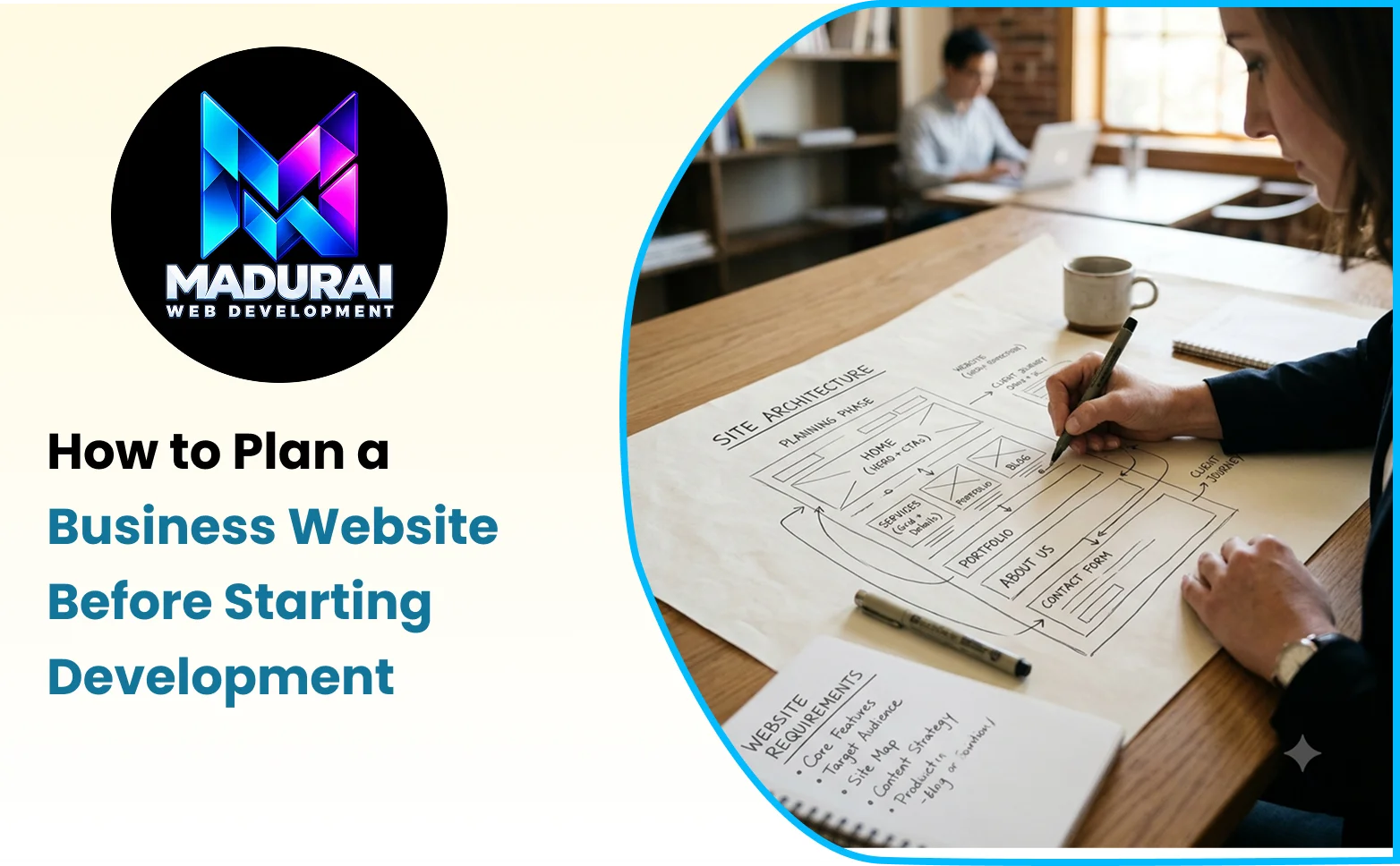
Create a sitemap before design begins. This helps identify missing pages, unnecessary duplication, and opportunities to connect related content logically.
Document Your Website Requirements for Small Business
Website requirements describe what the finished website must contain, how it should behave, and which conditions it must satisfy.
For small businesses, documenting these requirements is particularly important because budgets and development resources may be limited. Clear requirements help ensure that essential features are included before work begins.
Separate requirements into three practical categories.
Business requirements describe the outcomes the website must support, such as generating enquiries, showcasing services, accepting online orders, or allowing customers to book appointments.
Functional requirements explain what users should be able to do. Examples include submitting an enquiry form, searching products, filtering services, creating an account, receiving booking confirmations, or making payments.
Non-functional requirements describe how the website should perform and operate. These may include mobile responsiveness, accessibility, security, page performance, browser compatibility, reliability, and maintainability.
For example, saying that a website needs a contact form is a starting point. A more complete requirement would explain which information the form collects, where submissions are delivered, how validation works, and what confirmation the visitor receives.
This level of detail helps developers estimate the work accurately and reduces misunderstandings during implementation.
Choose the Right Website Features and Functionality
Once the business goals and requirements are clear, decide which features are necessary for launch.
A typical service website may need enquiry forms, click-to-call links, service galleries, testimonials, and analytics tracking. Other businesses may require appointment scheduling, customer portals, product catalogues, payment gateways, or third-party integrations.
Every feature should have a clear purpose. Adding functionality simply because competitors use it can increase development and maintenance costs without improving the customer experience.
Distinguish between essential launch features and enhancements that can be introduced later. For example, a basic service website may launch successfully with well-written service pages and a reliable enquiry form, while an advanced customer portal can be planned as a later phase if it is not necessary for the initial business objectives.
Also consider who will manage the features after launch. A booking system, inventory integration, or customer account platform may require ongoing updates, monitoring, and support.
Plan Your Website Content Before Design
Content planning is often overlooked until the design is nearly complete. This can lead to layouts that do not fit the actual content, incomplete pages, and unnecessary delays.
Prepare a content outline for each important page before development begins. Identify the main message, supporting information, images, customer questions, and desired action.
For a service page, this might include a clear introduction, an explanation of the service, its relevant benefits, the working process, genuine examples, frequently asked questions where useful, and a suitable call to action.
Use language your customers understand. Avoid vague promotional claims and explain the service in practical terms.
Prepare images, logos, team information, project examples, and other required assets early. Confirm that you have the appropriate rights or permissions to use them.
Content preparation also helps developers create suitable page templates and allows the design to support the information rather than forcing the content into an unsuitable layout.
Establish Your Website Design Direction
The design stage should translate your business goals and audience needs into a clear visual and interactive experience.
Decide how the website should represent your brand, including logo usage, colour palette, typography, image style, spacing, and visual hierarchy. The design should remain consistent while making the content easy to understand.
A professional business website does not necessarily require complex animations or elaborate effects. It should make the business's value clear, help visitors find information, and guide them towards relevant actions.
Plan for responsive layouts from the beginning. Navigation, typography, images, forms, and interactive elements should remain usable across smartphones, tablets, and desktop screens.
Before full development, review wireframes or design mock-ups of important pages. This provides an opportunity to correct layout and content issues before they become more expensive to change.
Select the Appropriate Technology and Development Approach
The technology used to build the website should match its requirements, available resources, and expected future development.
A relatively simple business website may be suitable for a conventional content management system or a lightweight custom implementation. A website with specialised workflows, complex integrations, customer dashboards, or custom business logic may require a more tailored development approach.
Consider the following questions before selecting the technology:
-
Does the platform support the required features and integrations?
-
Can the website be maintained and updated efficiently?
-
Does the development approach support security and performance requirements?
-
Can the website expand if the business introduces new services or functionality?
-
Who will manage future updates, backups, and technical support?
These decisions should be based on the project's actual requirements rather than technology trends alone.
A simpler solution may be more suitable when the requirements are straightforward, while custom development may provide greater control when the business needs specialised functionality.
Plan Your SEO Structure Before Development
Search engine optimisation should be included in the planning stage rather than treated as an afterthought.
Begin with keyword research to understand how potential customers search for your products or services. Map relevant search intent to suitable pages, ensuring that each important page has a clear topic and provides useful information.
Plan descriptive URLs, unique page titles, relevant meta descriptions, logical heading structures, internal links, image alt text, and appropriate structured data. The website should also provide search engines with access to important content through a sensible navigation structure and a correctly configured XML sitemap.
For businesses targeting local customers, location information should be included where it genuinely supports the service and user intent. Avoid creating repetitive location pages that offer little unique value.
If you are replacing an existing website, record current URLs and identify pages that already receive organic traffic or valuable backlinks. This information will help preserve useful content and plan redirects if URLs change.
Good SEO planning supports discoverability, but rankings depend on content quality, competition, technical accessibility, relevance, and other factors beyond website structure alone.
Define Your Budget, Timeline, and Project Scope
A realistic budget should account for more than design and development. Depending on the project, expenses may include domain registration, hosting, content creation, professional photography, paid integrations, security tools, maintenance, and future enhancements.
The project scope should explain what is included in the initial delivery and which features are outside that scope. This helps reduce unexpected costs when new requirements arise.
Establish a timeline with key milestones, such as requirements approval, content completion, design approval, development, testing, and launch. The schedule should allow sufficient time for feedback and quality assurance.
Businesses should also identify who is responsible for supplying content, approving designs, providing credentials, and making final decisions. Delayed content or approvals can affect the launch date even when development is progressing as planned.
A clear project scope helps the business prioritise essential work and make informed decisions when budget or timing constraints arise.
Prepare for Security, Privacy, and Accessibility
Security and accessibility requirements should be considered before development begins because they can affect architecture, forms, integrations, and testing.
Plan for HTTPS, secure administrative access, appropriate software updates, reliable backups, and suitable protection for forms and stored information. Websites that collect personal data should explain their information-handling practices through an accessible privacy policy.
For ecommerce or booking platforms, additional considerations may include payment security, customer account protection, transaction records, and appropriate access controls.
Accessibility should also be built into the design and development process. Consider colour contrast, meaningful alternative text, keyboard navigation, readable content, semantic HTML, and properly labelled form fields.
These practices help create a website that is more reliable, easier to use, and better prepared for long-term maintenance.
Define Testing and Launch Requirements
A website should not be published simply because its pages look complete. The testing plan should verify that the website works correctly and supports the intended user journeys.
Test the website across common browsers, devices, and screen sizes. Check navigation, buttons, images, forms, payment or booking workflows, and any third-party integrations.
Review page titles, metadata, canonical tags, redirects, structured data, robots directives, and sitemap configuration. Confirm that important pages are accessible to search engines and that development or staging restrictions are configured correctly for production.
Test analytics and conversion tracking before launch, and verify that enquiry submissions reach the correct destination. If the website replaces an existing version, confirm that relevant redirects and internal links work as intended.
Document any remaining issues and decide whether they prevent launch or can be addressed in a later update. A defined launch checklist helps reduce the risk of overlooking critical problems.
Plan for Maintenance and Future Improvements
Website planning should include what happens after launch. Websites need ongoing attention to remain secure, accurate, functional, and aligned with changing business requirements.
Decide who will manage content updates, technical maintenance, backups, security reviews, performance checks, and analytics reporting. Establish a process for reviewing enquiries and identifying customer feedback that could inform future improvements.
The website should also be flexible enough to support reasonable future changes. For example, a service business may later introduce additional services, publish educational content, or add appointment booking.
Planning for maintenance from the beginning helps prevent the website from becoming outdated or difficult to manage as the business grows.
Business Website Planning Process: From Idea to Development
A practical business website planning process can be organised into six connected stages.
Stage 1: Discovery. Define business goals, understand the target audience, review competitors, and identify the problems the website should solve.
Stage 2: Requirements. Document the pages, content, functionality, integrations, technical expectations, and essential launch features.
Stage 3: Structure and content. Create the sitemap, plan the user journeys, map keywords to pages, and prepare the required content and assets.
Stage 4: Design and technology. Approve the visual direction, review important page layouts, and choose a development approach that meets the requirements.
Stage 5: Development and testing. Build the website, implement the planned features, verify technical SEO, and test important user journeys across devices.
Stage 6: Launch and evaluation. Publish the website, verify tracking and indexing settings, monitor performance, and prioritise improvements based on real usage.
These stages provide a useful framework, although some activities may overlap. For example, content planning and design often develop together as the project requirements become clearer.
Common Website Planning Mistakes to Avoid
One common mistake is beginning development without documenting the requirements. When expectations remain unclear, the business and development team may have different understandings of what the finished website should include.
Another mistake is prioritising appearance over functionality. A visually attractive design cannot compensate for missing service information, broken enquiry forms, confusing navigation, or poor mobile usability.
Businesses may also underestimate content preparation, assume SEO can be added entirely after launch, or allocate the entire budget to initial development without considering ongoing maintenance.
Selecting technology before understanding the requirements can create unnecessary complexity. Similarly, adding too many features to the initial scope can delay launch and make the project more expensive than necessary.
The most effective way to avoid these problems is to document decisions early, distinguish essential requirements from optional enhancements, and review progress against the agreed project scope.
Conclusion
Planning a business website before development begins helps ensure that the finished product supports real business objectives rather than simply looking attractive. By defining goals, understanding customers, organising pages, documenting functionality, preparing content, and establishing technical requirements, businesses can reduce uncertainty and make better use of their development budget.
A structured website planning checklist for business owners also helps connect design decisions with SEO, security, accessibility, performance, and long-term maintenance. These considerations are easier to address when they are part of the initial plan instead of being treated as last-minute additions.
For businesses preparing a new website or a major website upgrade, Madurai Web Development can be considered when exploring suitable design and development requirements. The key is to begin with a clear scope, make decisions based on customer needs, and establish a process for testing and improving the website after launch.
A well-planned website provides a stronger foundation for customer trust, online visibility, and sustainable business growth.